

Planning software for wedding and event DJs
Your clients plan the night. You play it.
Send every client one link to a planning page with your name on it. They fill in the timeline, answer your questions and pick their songs — no app, no account — while reminders do the chasing. You walk in with the whole night on one printed packet.
Free for 14 days, then from $14.95 a month. Renews automatically — cancel anytime.
- No app or account for clients
- Weddings, corporate & parties
- Unlimited events
- Cancel anytime
Why All Set DJ
Planning shouldn’t be the hardest part of the gig
From DJs using it
Less chasing, more time for the business
All Set DJ is one of the most helpful tools for my business. With its automatic reminder emails and suggestion functionality, planning is completely automated and saves me so much time on my day-to-day preparation work.
 Global Society Events & EntertainmentHouston, Texas
With all the weddings we do in a year, I couldn’t imagine running my business without All Set DJ. With the Business plan it’s so easy to keep track of every client while making sure my DJs are organized and prepared for every event. The automation lets me spend less time sending reminders and more time building my business.
 Byrne Rock Mobile DJ ServiceAustin, Texas
How it works
From booking to the last song
- 1
Book the event
Add the date and the venue, and start from one of your templates: the running order, your questions and the song lists are already there.
- 2
Send one link
Your client opens it on their phone and plans at their own pace, while you watch their progress from your dashboard.
- 3
Play the night
Take a clean PDF packet to the gig, with every cue and its song, and bring the song lists into whichever service you play from.
See it all in 22 minutes
A full tour, from booking an event to the packet you take to the gig.
Prefer YouTube? Watch it there
Songs
Songs, done properly
- Search millions of songs, or paste a link to the exact live or acoustic version.
- Bring in a whole playlist from a file or a list of song links.
- Must-play stars, a note on any song, and a do-not-play list with room for “no line dances”.
- Your own song suggestions, in playlists your clients can browse and add from.
Your dashboard
Every event at a glance
- A progress bar on every event shows who’s behind — and a tag when a client says they’re finished.
- Set when plans are due and when they lock, once, for every event you book.
- Templates for each kind of event, so every client gets your running order and your questions.
- On the Business plan, give each event to one of your DJs and see the whole team’s calendar.
Reminders
Reminders do the chasing
- Pick the days — say 60 and 30 days before — and each client who isn’t done gets an email.
- It lists exactly what’s left, with a button straight back to their plan.
- They go out under your business’s name, and replies come to you.
- They stop the moment the plan is done, or the client says they’re finished.
On the night
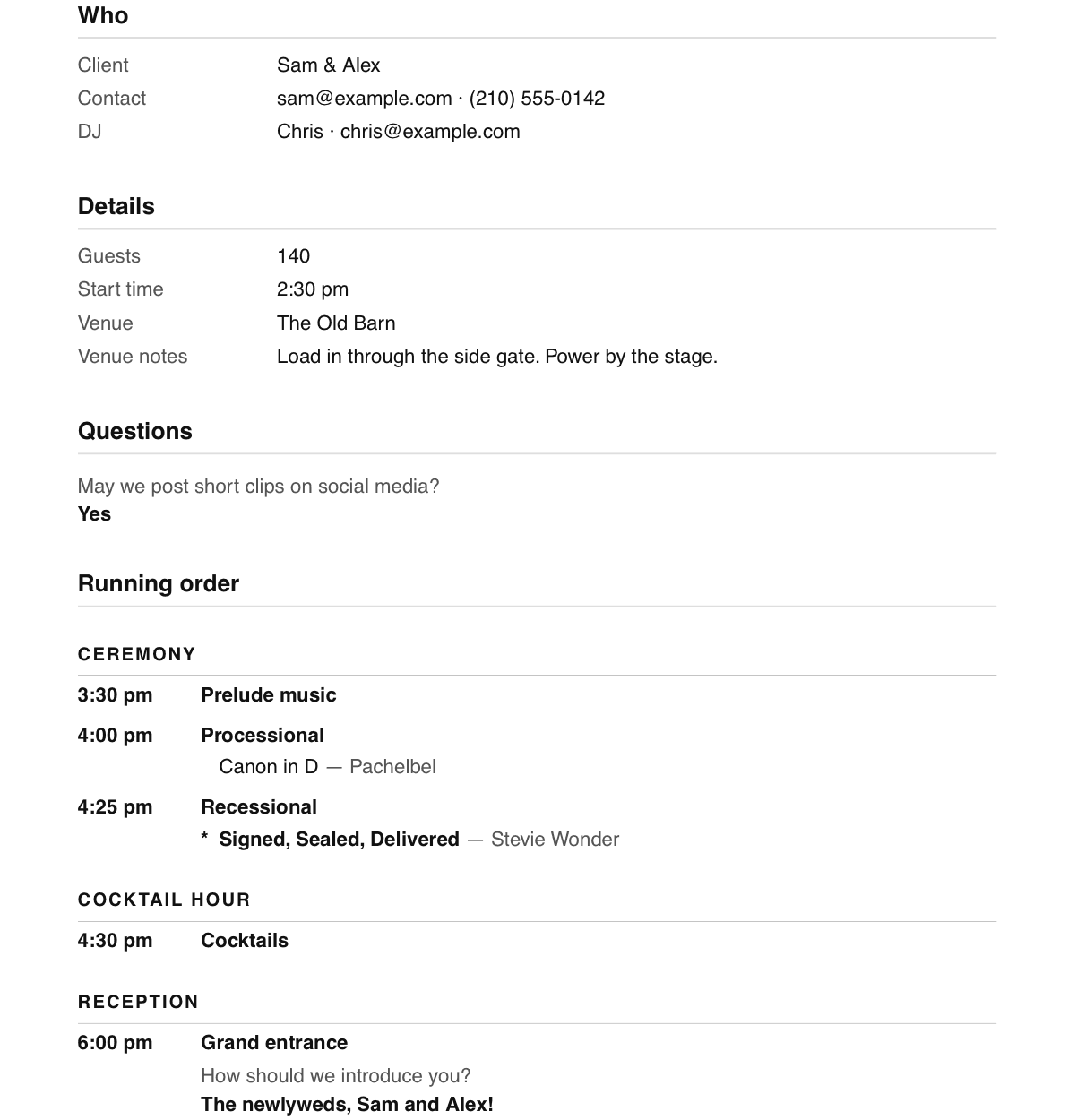
Walk in with the whole night on paper
- One PDF: the running order with every cue and its song, your client’s answers and every playlist.
- A list at the back of any tracks you still need to download.
- A view-only link for the venue or the planner, who can see the plan and download it too.
- Song lists out as a file for whichever streaming service you play from.
Features
Everything a planning meeting covers
Automatic reminders
Pick the days, and every client who isn’t done gets an email listing exactly what’s left. They stop once the plan is done.
Templates
Save a running order, its questions and its song lists once. Every new booking can start from it.
Your questions
Ask every wedding, corporate event or party the same questions, and add more on any moment of the night.
Song suggestions
Playlists of your ideas — first dances, dinner jazz — each with a cover of your own, for clients to add from with a tap.
View-only links
Share the plan with the venue or a planner. They can read it and download the PDF, but not change it.
Built for teams
On the Business plan every DJ gets their own login and events, and the owner sees everything.
Private by design
Each plan opens only with its own private link, and every business’s events are kept apart.
Unlimited events
No per-event fees and no caps: one price, however busy your season gets.

About
Built by a DJ, for DJs
I’m Milo, and I run MP Entertainment, a mobile event DJ company in Austin, Texas. Every event we play starts with the same job: getting the timeline, the moments, and the music out of the client before the big day — usually over a primitive planning form or PDFs that are hard to keep organized.
I built All Set DJ to do that job for us. Every client gets one link, reminders do the chasing, and we walk in with the whole night on paper. We plan our own events with it, and now you can plan yours.
Milo Paciorek · Owner, MP Entertainment
Pricing
Every planning feature, on every plan
Start with a 14-day free trial, and pay monthly or for the year. Unlimited events on both.
Both plans start with a 14-day free trial, and a card is needed to begin. When the trial ends, your plan renews automatically each month or year at the price shown, plus sales tax where it applies, until you cancel. Cancel anytime from your account: before the trial ends and you pay nothing; after that, your plan runs to the end of the period you’ve paid for. Prices in US dollars.
Questions
Good to know
Do my clients need an account or an app?
No. They open the link you send on any phone or computer, and everything saves as they go.
Will my clients see my business or yours?
Yours. Your logo and business name sit at the top of every client’s planning page, reminder emails carry your business’s name, and replies go straight to you.
Is it only for weddings?
No. New events start from a running order for a wedding, a corporate event or a private party — or from templates of your own for anything else you play.
Do I need to connect a streaming account?
No. Search songs, paste links and bring in playlist files without connecting anything, then export the finished lists to whichever service you play from.
What happens after the free trial?
Your plan renews automatically at the price you chose — from $14.95 a month, or yearly — plus sales tax where it applies, until you cancel. Cancel before the 14 days are up and you pay nothing.
Can I cancel anytime?
Yes, from your account in a few clicks. Your plan runs to the end of the period you’ve paid for, and nothing renews after that.
What if a client misses the deadline?
You choose when plans are due and when they close. A closed plan can be reopened for any client, and you can change anything yourself at any time.
Is my clients’ information private?
Each plan opens only with its own private link, every business’s events are kept apart, and nothing a client fills in is ever used for advertising. Our privacy policy has the details.
Can I add DJs later?
Yes. The Business plan includes five DJ seats; add more, or remove the extras, from your account whenever you like — the change is prorated. To move between Individual and Business, email us.
Can I see it before I start?
Yes — book a demo, by video or phone, and we’ll walk you through it. Or start the free trial: nothing is charged for 14 days.
Your next booking, planned properly.
Free for 14 days, then from $14.95 a month. Renews automatically — cancel anytime.